
• English
  • Merchant platform parameter configuration

    This topic describes how to configure product parameters and obtain the parameters required for development.

    1.Contact BD to confirm the product to be connected and complete the agreement signing.

    2.Provide detailed information required to access the product

    You must provide the following content-Form Download:Apply Product.xlsx (11KB)

    Products to be AppliedMaterialsReferenceMaterials Type
    Pay out1.Please provide the usage scenario of this productThis product will be used in scenario where……text
    Pay out2.Please estimate daily transfer frequencyDaily and monthly transaction frequency and total amount will be XXX/XXXX respectivelytext
    Pay out3.Please estimate daily total transfer amount  
    text   
    Pay out4.Please estimate monthly transfer frequency  
    text   
    Pay out5.Please estimate monthly total transfer amount  
    text   
    Pay in (Pay with Bank Transfer/Wallet/MoMo)1.Please provide the usage scenario of this productUp to 500 characters can be entered,This product will be used in www.xxx.com or App named XXXX(accessible in GP store)text
    Pay in (Pay with Bank Transfer/Wallet/MoMo)2.Please upload the webpage/APP screenshot of the usage scenarioUpload a screenshot of your website or app (image format)picture(.png/.jpg)
    Login with PalmPay1.Please provide the usage scenario of this productThis product will be used in www.xxx.com or App named XXXXtext
    Login with PalmPay2.Authorize login callback domain nameAfter the user agrees to authorize, they will be redirected to the h5 address provided by the external merchant. The h5 address must start with the authorized login callback domain name For example: https://google.comtext
    Login with PalmPay3. IT, DATA, SECURITY & PRIVACY policyUpload data security, privacy protection policyfile(.pdf/.doc)
    Virtual Account1.Account Suffix of InstitutionAccount suffix of the institution will be attached to each virtual accounttext
    Virtual Account2.Due Diligence DocumentAsk BD for the Due Diligence Document templatefile(.pdf/.doc)
    Virtual Account3.Virtual Accounts quantity limitMaximum number of Virtual Accountstext

    Please provide the corresponding information to BD to complete the product activation.

    3.Merchant platform parameter configuration

    After the product application is approved
    ① Obtain the key:Generate public and private keys (After the document generates the key, log on to the merchant background to complete the API parameter configuration) ② Parameter configuration:
    a. Enter Merchant Public Key in the blank column of the Merchant Public Key, and please keep the Merchant Private Key safe;
    b. Enter the IP domain Name;
    c. Enter the APP Name ③ Support creating multiple AppIDs with the same products and interfaces
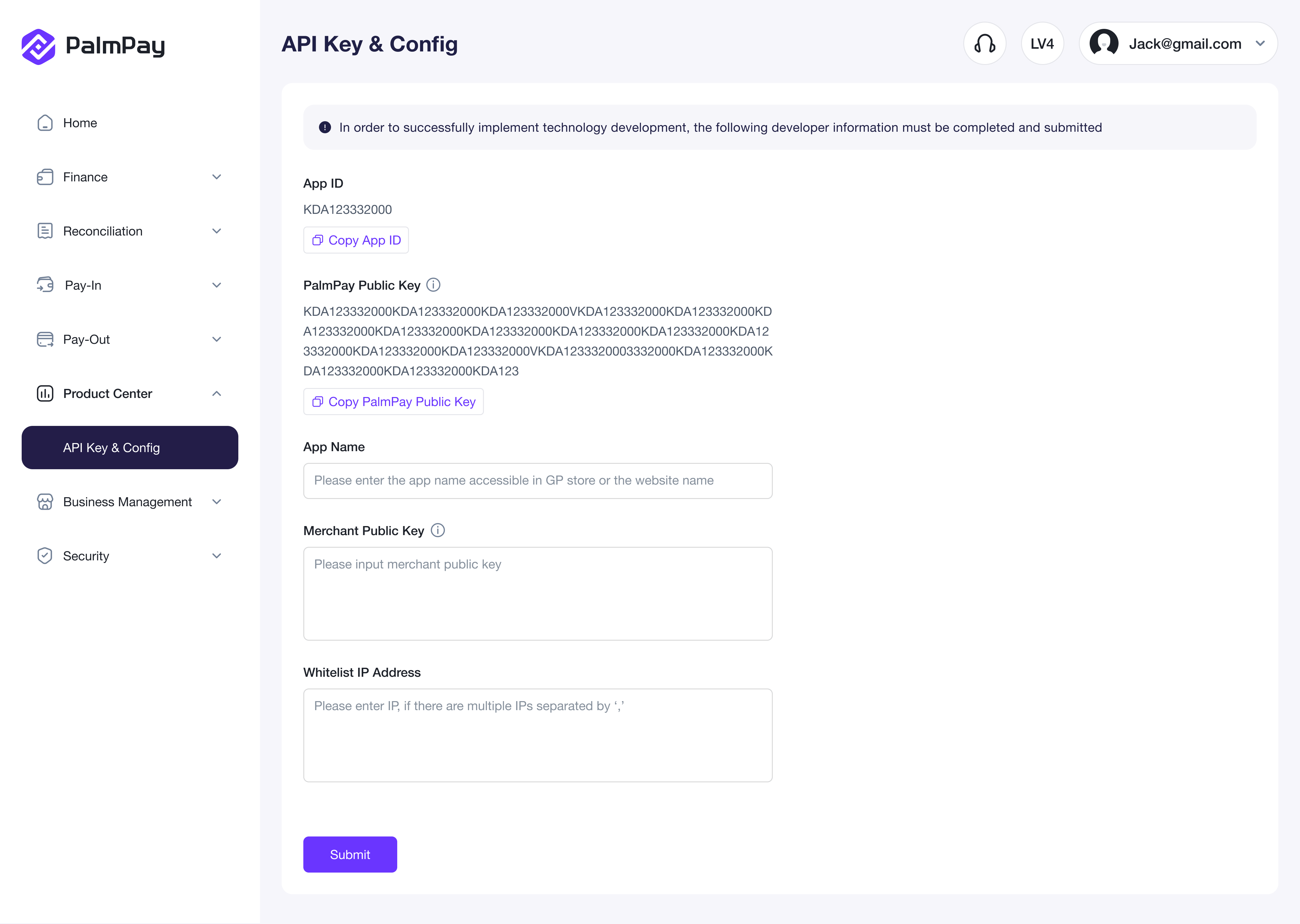
    After the submission is completed, it takes effect.
    The following parameters are required for the development process:

    ParameterParameter UsageRules or Other Related Instructions
    App IDThe ID of the merchant's application. You must specify the ID when you initiate a request.L, automatically generated by the system
    PalmMerchant Public KeyThe RSA asymmetric encryption public key provided by the PalmPay is generated by the PalmPay and used to decrypt the encrypted information provided by the PalmPay.None, users can directly copy and use it
    App NameThe merchant defines the name of the App, which is filled in by the merchant himself.No special rules
    Merchant Public KeyThe RSA asymmetric encryption public key generated by the merchant is generated by the merchant and provided to the PalmPay to decrypt the encrypted content returned by the merchant.Encryption rules: RSA asymmetric key, 1024 bits
    Whitelist IP AddressUsed for inter-system service security conditionsSeparate multiple IP addresses by(,)